Trading App Features For People Starting Their Stock Journey
Starting in the stock market can feel challenging when you are unfamiliar with market terms, investment options and trading processes. Digital applications have made it easier to access stock market services from a smartphone. A Trading App allows users to view share prices, study market information, place orders and review their investments without relying entirely on a desktop computer.
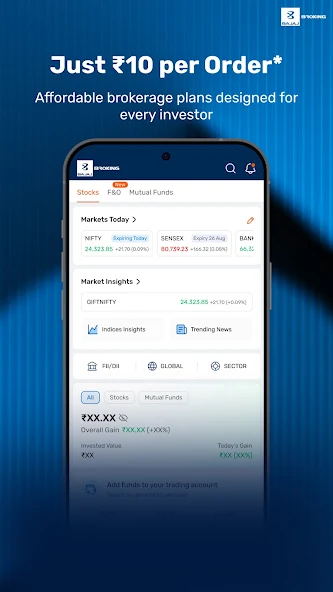
However, using an application does not remove the risks involved in investing. Beginners should understand how transactions work and compare available services before selecting a platform. A suitable Share Trading App can make Online Stock Trading more accessible by providing account information, research tools and order management features in one place.
What Is a Trading App?
A trading app is a mobile application provided by a stockbroker to help users access financial markets. It connects an investor's trading account to the broker's system, allowing orders to be placed through a smartphone or tablet.
Depending on the broker, an application may provide access to:
- Stock prices and market information.
- Company search and watchlists.
- Buy and sell order placement.
- Portfolio and holdings details.
- Price charts and technical indicators.
- Transaction history and account statements.
- Funds and margin information.
- Notifications about orders and account activity.
In India, investors generally use a trading account to place orders and a demat account to hold shares electronically. These accounts are often opened together through the same broker.
How Does a Trading App Work?
Understanding the basic process can help beginners use a trading application more confidently.
- Open a Trading Account
The first step is selecting a registered stockbroker and completing the account opening process. Applicants generally need to provide PAN details, identity information, bank details and other documents required by the provider.
Many brokers support digital verification, which allows eligible applicants to complete much of the process online.
- Add Funds to the Account
Once the account is active, users can transfer money from their linked bank account. The available balance can be used for eligible purchases, subject to broker rules and applicable market requirements.
Investors should understand the difference between available funds, used margin and withdrawable balance before placing orders.
- Find and Research Stocks
Most applications include a search feature that helps users find listed companies by name or symbol. Before buying shares, investors should examine company information, financial performance, industry conditions and relevant announcements.
A stock's recent price increase alone is not enough to establish whether it is a suitable investment.
- Place a Buy or Sell Order
After selecting a stock, users enter the quantity and choose an order type. The broker sends the order to the relevant stock exchange through its trading system.
The order may be executed immediately, partially completed or remain pending depending on the price and market conditions.
Important Features Beginners Should Look For
A trading application should provide clear information and tools that support basic investment decisions. The following features are worth comparing before opening an account.
Live Market Prices
Market prices help users understand the latest available value of a share. Some brokers provide real-time price information, while others may offer delayed data depending on their services.
Check whether the prices are updated in real time. Market values can change quickly, so the displayed price may differ from the final order execution price.
Watchlists
A watchlist allows users to save selected stocks and follow their price movements. Beginners can create lists of companies they want to research without purchasing their shares immediately.
Watchlists can be organised by industry, investment interest or other categories that make comparisons easier.
Charts and Technical Indicators
Price charts display stock movements over different periods. Common formats include line charts, bar charts and candlestick charts.
Some applications also provide indicators such as moving averages and the relative strength index. These tools can help users study historical price patterns, but they cannot predict future returns with certainty.
Portfolio and Holdings
The portfolio section displays information about investments and securities held in the demat account. It may show quantities, purchase details, current values and profit or loss.
Investors should remember that portfolio values change with market prices and may not reflect the final amount received after selling.
Order History
Order history helps users review completed, pending, rejected and cancelled orders. It is useful for checking transaction details and understanding whether an order was executed as expected.
Beginners should learn how to access this section and review it after placing trades.
Notifications and Alerts
Notifications can provide updates about order execution, funds, account activity and selected stock prices. These alerts help users stay informed, but they should not replace independent research or regular account reviews.
Understanding Different Order Types
Before placing a trade, beginners should understand how different order types work.
Market Order
A market order instructs the broker to buy or sell a security at the best available price. It generally prioritises execution over a specific price.
The final execution price may differ from the displayed price, particularly when the market is moving quickly or the stock has limited liquidity.
Limit Order
A limit order allows users to set the maximum price they are willing to pay when buying or the minimum price they will accept when selling.
The order executes only when the market reaches the specified price and sufficient quantity is available. Execution is not guaranteed.
Stop-Loss Order
A stop-loss order helps investors manage potential losses. When the specified trigger price is reached, the order becomes active according to its conditions.
Users should understand the trigger price and execution rules before relying on this order type.
How to Choose a Suitable Share Trading App
Not every broker provides the same services or pricing. Beginners should compare several factors before selecting an application.
Compare Brokerage and Other Charges
Trading costs may include brokerage, exchange transaction charges, securities transaction tax, GST, regulatory fees and other applicable levies. Some brokers may also charge annual maintenance or optional service fees.
Read the complete pricing schedule before opening an account. A low brokerage rate does not mean all transactions and services are free.
Check Security Measures
A trading application handles personal and financial information. Look for secure login options, two-factor authentication, device verification and transaction alerts.
Use strong passwords and never share account credentials, PINs or one-time passwords with anyone.
Review App Stability and Customer Support
An application should provide consistent access to account information and order services. Beginners should also check the broker's support channels and how it handles account or transaction-related queries.
Understand Available Market Segments
Some brokers provide access to equity trading, while others also support derivatives, commodities and other products. Select services based on your knowledge and investment requirements. Avoid trading in unfamiliar products simply because they are available in the app.
Practical Tips for Starting Your Stock Journey
Begin by learning basic stock market concepts and understanding the difference between investing and short-term trading. Research companies before purchasing their shares and use watchlists to follow stocks that interest you.
Start with an amount that matches your financial situation and risk tolerance. Avoid borrowing money to trade unless you fully understand the risks and applicable requirements.
Review your holdings and transaction statements periodically. Keep account details updated, understand the taxes and charges that apply, and seek qualified financial advice when necessary.
Conclusion
A trading application can make stock market participation more convenient by providing access to market information, order placement and portfolio management through a smartphone. When selecting a Trading App, beginners should compare its pricing, security, research tools and customer support. A suitable Share Trading App should make account information clear and help users manage transactions responsibly.
Learning the basics of Online Stock Trading is essential before investing money. Careful research, realistic expectations and an understanding of market risks can help people develop more responsible habits as they begin their stock market journey.